

This guide is in English for now. The tool itself works in your language.
How to make a payment voucher
A payment voucher records money your business paid out when there is no proper bill, or as the internal approval of a payment: wages, cartage, repairs, advances to staff.
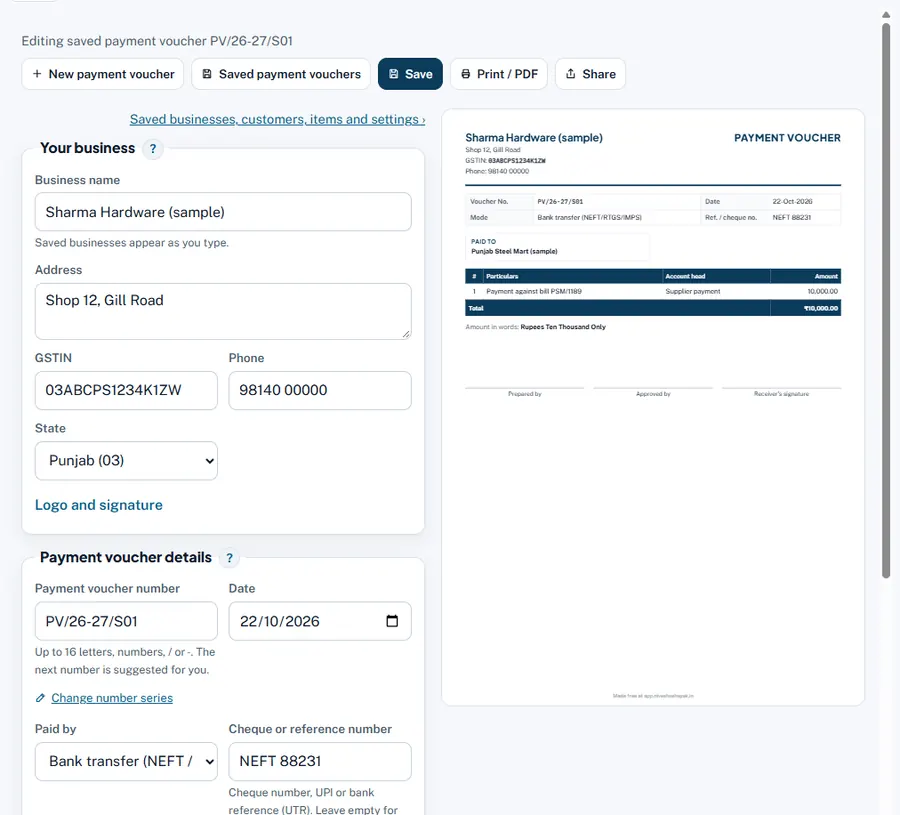
Step by step
- Payment voucher details. Number, date, Paid by and the cheque or reference number and date.
- Paid to. Name of the person or firm paid.
- What was paid for. Lines of Particulars, Account head and Amount (₹); Add item for more.
- TDS and reverse charge. TDS section (for example 393 (old 194C)), TDS rate % and Payee's PAN: the net amount paid is worked out. Tick GST on this payment is payable by us and the rate if reverse charge applies.
- Signatures. Prepared by and Approved by; the payee signs the printed voucher.
Worked example
Loading charges ₹35,000 to a contractor (individual) with PAN: TDS 1% = ₹350, net paid ₹34,650 by bank transfer. Without a PAN the voucher warns that TDS is 20%.
Rules and dates
TDS sections are numbered under the Income-tax Act, 2025 from 1 April 2026 (the maker shows the old section in brackets). Payments above ₹10,000 in cash to one person in a day are not allowed as a business expense.
Common mistakes and how to fix them
- A supplier's bill paid with only a voucher. Enter the bill in the App as a purchase bill, and the payment as Money paid.
Try it now: it is free and needs no login.Open the voucher maker
Related help
Money paid to suppliersMoney paid works like money received, the other way round: it settles your purchase bills, and the App keeps track of…Work out TDS on a paymentBefore you pay a contractor, a professional or rent, check whether you must deduct TDS, at what rate and how much to…Print, PDF, WhatsApp and designsA saved payment voucher can be printed on paper, saved as a PDF, or sent straight to the person paid on WhatsApp or…